Random Length Tally Item
You can use a random length tally item setting when the item or material being sold is not being sold or maintained with preset lengths or unique stock numbers. An example item might be 3/4-round moulding that is cut on-site and measured during check-out.
For this item, it would make sense to use this type of tally rather than attempt to assign individual stock numbers to all the possible lengths that might be sold. Random-length tallies maintain their own quantities and don't sell from other items. At Point of Sale, you can either:
(a) enter the total lineal footage, or
(b) enter detailed quantities and lengths in the grid area which will calculate the overall lineal footage instead.
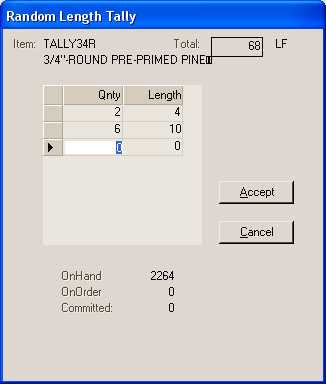
The "random length" type is created using a single item. Usually, the BASE unit of measure represents the most commonly sold quantity measurement such as lineal feet (or however else it's measured such as meters, inches, etc.). In addition, it's likely that pricing will be done using the same measurement. If the item is sometimes sold in partial quantities, it's possible to leave unit of measure rounding off on the item so that partial quantities may be sold when needed (such as 6.5 feet, for example). On this type of tally item, the tally item flag is set to Y (yes) under the Codes tab, but the tally group field is left blank.
One important point about random-length tallies is that the application does not track individual lengths of a tally in stock, as received, or when sold. The quantity-lengths entered are only used for calculating the overall length (lineal footage, for example), and are not maintained except as an additional description line on the documents created by the particular transaction. Comments are formatted as quantity-length comments (24-8', 14-10', etc.).
Creating a Random Length Tally Item
The same item is used for all different lengths, so only one item per type would be needed; however, it would be necessary to have different tally items for different types of molding or species, etc.
To create a Random Length tally item:
1. From the Main Menu, choose Inventory > Database > Item. The Item Maintenance form displays.
2. In the Item field, Description field, and Group/Section list, enter/choose the appropriate entries for the new tally item.
3. Choose the appropriate Item Type in the Common > Measures tab. Complete the other item-specific measurements and settings in this tab.
4. Click the Tally tab and choose the Random Length Tally option.
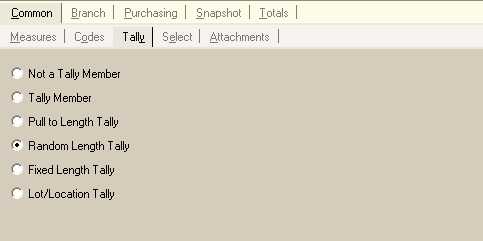
5. Complete the other item settings required for this item as described in this topic.
6. When you are ready to save this random length tally item, choose Process (F12).