Parameters > Point of Sale > Fineprint
Use the Fineprint feature to add either text or a file-based image (PNG) on the back of selected Point of Sale, Purchase Order, Accounts Receivable,
IMPORTANT: To use this feature, enable the Fineprint Enabled check box in the Device Maintenance form for the associated printer.
For this to occur, the printer must allow for duplex printing. Not all printers perform this. You may have to enable duplex printing for the device and or the driver you have installed even if the option is available. If duplex printing is not enabled or available, any fineprint will print as an additional page instead.
We strongly suggest testing this feature with each printer you intend on using it with. Choose Process (F12) to save any changes to the fineprint as well as any other changes to parameters that were made.
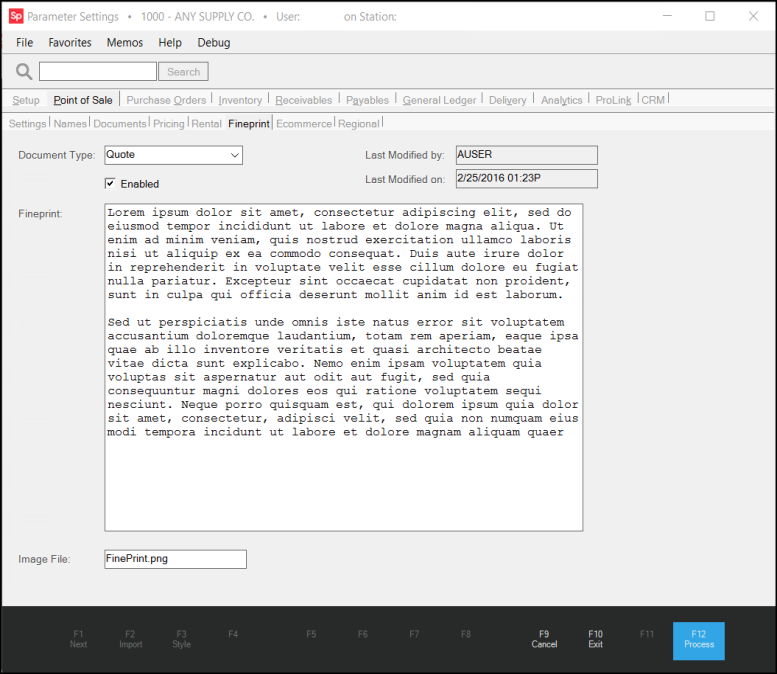
Fineprint
Document Type
You can associate fineprint with the following document types: invoices, orders, quotes, purchase orders,
Enabled
Use this check box to indicate whether the fineprint for the selected document is enabled. This can be used to disable or enable the fineprint feature on a document as needed.
Last Modified by
The user who most recently updated the fineprint record for the selected document. Provided for auditing purposes.
Last Modified on
This is the date and time that the fineprint record for the selected invoice was last modified. This can be useful for determining whether the statement needs to be reviewed and updated. Any change to the record, including changes to the enabled status, text, and/or file name would cause this date and time to be updated.
Fineprint
Use this text-area to enter a plain text statement for the selected document. The maximum size allowed is quite large; however, if you want the statement to print on the back of a single page, you should limit the text accordingly. The text is only used if no file name is present. Text is printed within a 6 x 8.25 inch area (17.46 x 23.35 centimeters).
Image File
In place of plain text, you can instead use a PNG (Portable Network Graphics) type image file for your fineprint statement. This might be created as an image of a document, for example. This is ideal if having formatted text (bold, different fonts, etc.) is required. The file you designate must exist in the user defined images directory on the server (as specified on the Setup and Software tabs of the Parameters form). The image size on a document is 6.88 x 9.19 inches (495 x 662 pixels at 72 pixels/inch resolution).