PS Customer Orders
Customer Orders are created from the Orders transaction in the Point of Sale area. An order is a list of products that a customer has committed to purchasing. Often, some or all of the products need to be ordered from a supplier prior to sale. In this case, the order would likely be linked with a purchase order. Customer Orders may involve deposits which are held as security to help protect your company from potential loss (in cases where a customer decides to cancel or refuse their order after you've received the materials requested, for example).
Products on an order may be sold (invoiced) all at once or may instead involve several different transactions. Ordered products may also be organized into "ItemSets" which allow selection and organization of items into groups for invoicing, delivery, or other reasons.
Direct Ship orders use the same document type as Customer Orders. When the referenced order is a Direct Ship the document label will display Direct Order as opposed to just Order.
Document Search Options
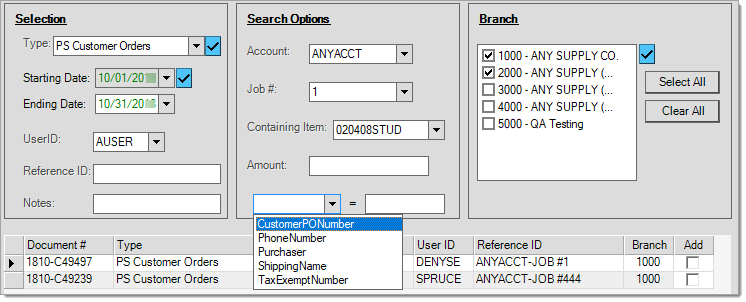
A number of Search Options are offered for PS Customer Order type documents. These include filtering the documents based on account, job, item, amount, and additional selections (which include the Customer's PO number, phone number, purchaser, shipping name, and tax exempt number). You can also specify one or more branches (when applicable) and use any of the standard selection criteria that includes date ranges, user ID, reference ID, and notes. Most search and selection criteria may be used in combination and most fields support the use of the % wildcard character.
Customer Order Styles (Summary)
For each printer device, your company can specify up to three document selections for each document type. If you need additional selections or styles for a specific printer, you can define additional printer devices that point to the same Windows printer device. Each selection can be assigned a number of copies, default tray, and style.
Printer document style defaults are set in the printer's Device Maintenance > Printers settings, using the Style column for each document type, as described here.
There are currently
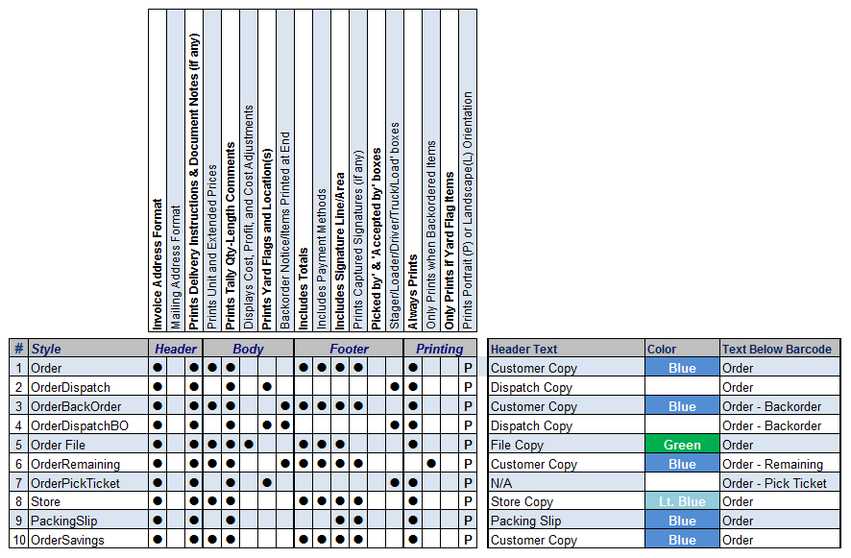
PS Order Styles Comparison
1. Order
This is the default style for Customer Order
2. Order Dispatch
This style is intended for Deliveries and is only available for customer orders (not direct ship). Delivery-Dispatch style orders don't include prices or totals, but do print additional information useful for delivery staging such as yard flags, locations, staging, and the total weight (using load factors... if assigned to items). An area is provided for specifying delivery information (load, truck, notes, etc.).
3. Backorder
This style only includes those items that were partially sold and also specifically designated for back order during a sale. This style does not include ordered items that haven't been sold or any items that were sold and have no remaining "unsold" quantities. If you want a list of all unsold items, use the Remaining style instead (see below). This style is not available for use with Direct Ship orders.
*There are only two styles available for Direct Ship orders: Order and File.
4. Dispatch Backorder
This style follows the same rules as the Back Order style explained above but is similar to the Dispatch version in appearance, however it doesn't include any prices or totals. This style does include additional information such as the yard codes and locations of the products (if any) and provides an area for delivery information. This style is not available for use with Direct Ship orders.
*There are only two styles available for Direct Ship orders: Order and File.
5. File Copy
The File Copy is for your company's use and includes costs. This style is available for regular Customer Order
6. Remaining (Combo)
This style matches the back order style as far as format, but includes all unsold items, not just those that were specifically placed on back order.
*There are only two styles available for Direct Ship orders: Order and File.
7. Pick Ticket
The Pick Ticket style includes all products (regardless of any assigned yard code) and groups them based upon their assigned location(s). No pricing or totals are printed. Columns are provided for printing locations as well as any yard flags assigned to the listed products. An area for delivery information is printed at the bottom of the form. This style is not available for use with Direct Ship orders.
8. Store
The Store Copy is provided for your company's use. It only differs from the Customer Copy in that hidden item comments will print on this style.
9. Packing Slip
The "packing slip" style includes items, descriptions, and quantities only. No pricing, amounts, or totals are printed. This copy is intended for your "customer." It lists the quantity ordered, shipped (sold), and remaining. This style is not available for use with Direct Ship orders.
10. Order Savings
The Order Savings style is similar in concept to the Invoice Savings style used for sales invoices. It is the same as the Customer Copy order default style except that the suggested list price is printed below any items with a suggested list that is lower than their price for the item. A Total Savings figure is printed below the totals which is the difference between what the customer would have paid if they were paying full price for the same items. This style is not available for use with Direct Ship orders.
11. No Price
This style is the same as the default (Customer Copy) style except that no prices or totals are printed.
12. Contract
This style is the same as the File Copy except that it uses the Vendor Contract cost (if present) in place of the actual cost and for gross margin calculations. This style is only provided when the parameter Enable PO Contract Style for POS has been enabled (checked) on the Parameter Settings form (Main Menu > Maintenance > Database > Parameters > Purchasing tab).
*There are only two styles available for Direct Ship orders: Order and File.