ECOMMR-4719 – Opening Statements in Account Area Issue Resolved (SPEC Only).
A customer noticed that when they tried to open statements using the Job Summary Remit Only setting in the Account area, and they tried to print the statement, they received the message:
The selected statement did not print as expected. This occurred in Spruce and in Spruce eCommerce. We corrected this issue to ensure that Job (Summary and Remit Only) statements print as needed on both platforms.
ECOMMR-7911 – Invoice Totals Displaying Correctly for Tally Items. (SPEC Only)
We investigated a Spruce eCommerce issue that occurred when customers purchased tally items online. When these tally items had child rows, the application displayed them as separate line items on the invoice, which affected the totals calculated for the order. Many of these child items were used for internal cost tracking and were not intended to appear on customer invoices. We redesigned this code to hide these child rows from the process and only return visible, sellable item data. We tested this change to ensure that the subtotal matches the sum of the ExtendedAmt entries on the invoice, and validated that the tax and total remain consistent with the item pricing.
LBMHR-146 – Cost Correction Issues Associated with Installed Sales Resolved.
When you make cost corrections on invoices associated with Installed Sales, you expect the application to apply these changes as it would to other transactions. A customer reported that the cost corrections for installed sales, once applied, were not showing up in the Installed Sales Reports, the Invoice associated with the Contract, or the Installed Sales Contract Store Style documents. Due to the complexity of installed sales transactions, we could not update the values to reflect the cost correction amounts in the reports or invoice documents, so we opted to record the differences in values as a note on the documents (or reports) themselves. For example:
-
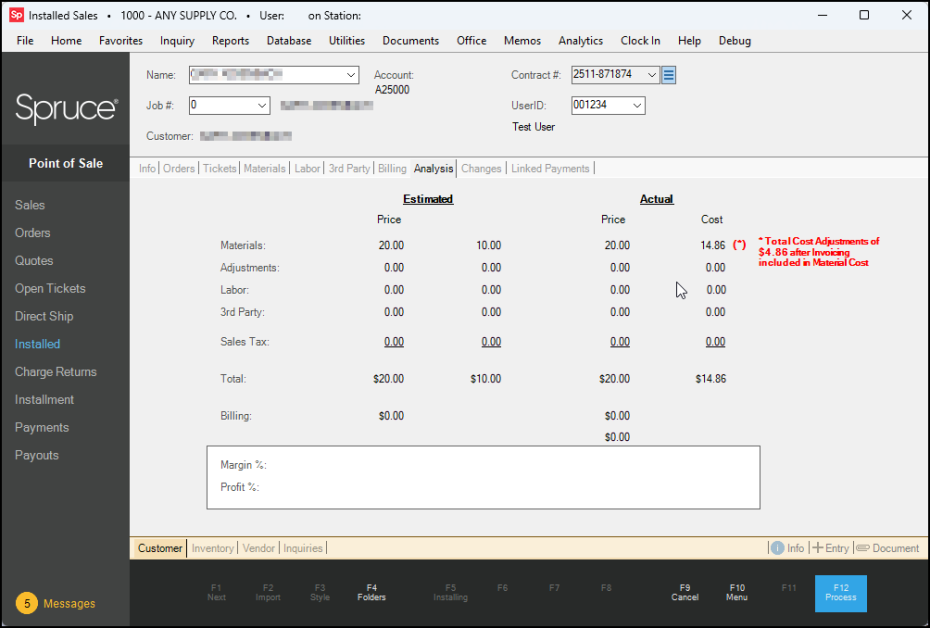
When you go into the Analysis tab for an Installed Sales contract with cost-corrected materials, a new message displays beside the materials entry to show the amount of the discrepancy and this explanatory message:
Total Cost Adjustments of $(X.XX) after Invoicing included in Material Cost.
-
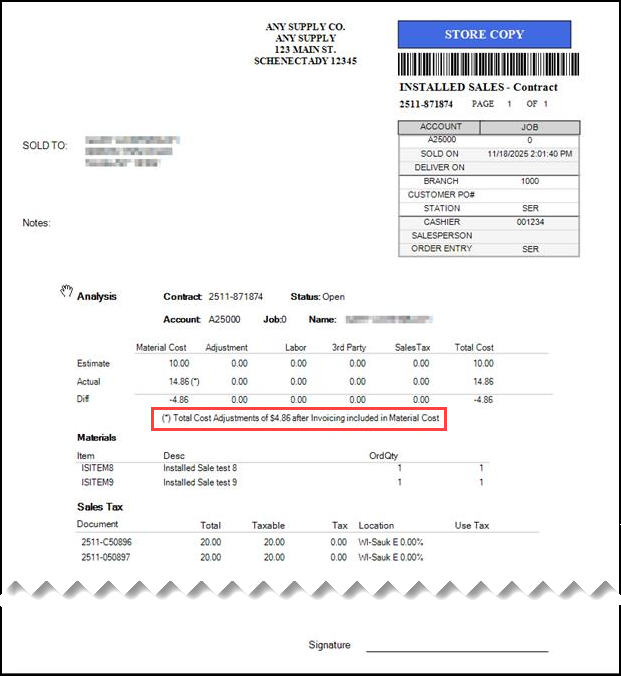
For Store Format Contract documents, a new message displays when there is a cost correction associated with the installed sales contract when the user chooses the Store format:
Total Cost Adjustments of $X.XX after Invoicing included in Material Cost
-
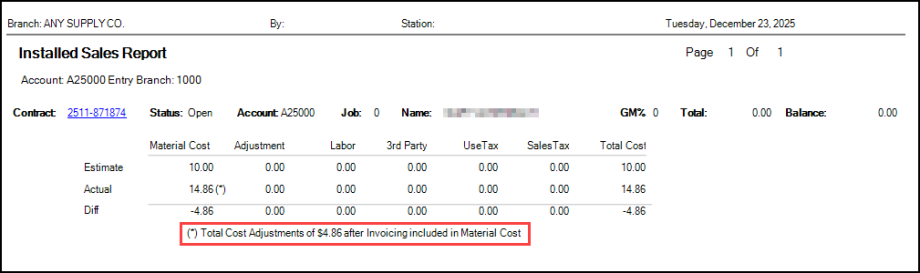
For Installed Sales Reports, we now specify the cost adjustments associated with the customer’s installed sales when the materials purchased had cost corrections:
Total Cost Adjustments of $X.XX after Invoicing included in Material Cost.
LBMHR-278 – True Value Limited Use Coupon Issue Resolved.
When applying a True Value Limited Use Coupon to a sales transaction, the application applied the coupon before assessing whether the total amount met the coupon criteria. We updated this process to ensure the coupon validity assessment is completed before we apply the coupon to the transaction.
LBMHR-773 – Update Ensures Specified Users cannot Change Card on File Settings for Accounts. There is a security setting in the User ID form that prevents unauthorized users from changing the Card on File (COF) settings for an account. When this setting, Restrict Prompts to Add/Replace Card on File is enabled, it should prevent that user from changing the COF settings for a customer. However, during the checkout process for a customer with a COF, when the application detected the COF account setting, the system prompted the user to ask if the customer wanted to make a change in the card. This was true, even if the user’s COF setting above was enabled. We have updated the checkout process to prevent this prompt from displaying. Qualified users can add or change an account’s card on file settings using the Payments > Add Card on File only.
LBMHR-986 – Clothing Item Tax Issues Resolved in Point of Sale Transactions.
There was an issue with the taxes applied to clothing items for card-on-file payments, which caused checkout failures and errors in the Daily Sales Report. As a result, the non-taxable total was counted twice in these transactions. We corrected the classification issues that caused this problem to ensure clothing sales taxes are counted only once and are using the correct category. If you have any additional checkout issues of this kind, we recommend you retry the transaction after between 60 and 120 seconds. The tax totals for clothing sales via card-on-file payments now appear correctly in the Daily Sales Report.
LBMHR-1325 – Changes Prevent Future Branch-Specific AP Billing Posting Issues.
When reversing an AP Billing document from a branch different than the transaction’s original branch, the system incorrectly posted the reversal (Vendor Credit) to the current user's branch AP GL account rather than the original AP billing branch GL account. This caused GL accounts to be off balance, which were caught in the resulting AP Aging reports, and created branch-level AP discrepancies in the data. This required manual journal entries to correct, which were time-consuming.
We updated our AP billing reversal logic to ensure that the application retrieves the original AP billing document‘s GL account and ensures that the Vendor Credit reversal posts to the same AP GL account used in that original billing document. We also added additional validation to ensure that the original document’s branch GL account is used in this processing. We are implementing additional safeguards to prevent the current session branch from overriding historical document branch data. We have added additional logging to track these types of reversals across branches and now include GL account validation to ensure we are offsetting entries correctly to maintain branch consistency.
LBMHR-1516 – Creating Duplicate Discount SKUs during Promotion Issue Corrected.
When you create an Instant Credit Promotion, you set item number limits and tie them to the promotion’s sale price. When a customer attempts to purchase a quantity above the promotion limit, the application should not add an additional promotional SKU to the transaction to expand the discount. This issue has been corrected.
LBMHR-1577 – AnyWare Label Printing Issue when using Zebra Printers Resolved.
When using AnyWare to print multiple labels to a Zebra printer, some customers reported issues with larger print jobs (typically 50+ labels). AnyWare sent the labels multiple times to the Windows print queue before they reached the printer. This resulted in wasted labels and longer processing times. We found that this issue was not related to the printer itself.
We resolved this issue by adding caching to the label print process, which prevents the same print job from being picked up and processed multiple times. The system now temporarily tracks print jobs and clears them after a short interval to ensure they are only executed once, even on slower devices. This issue is resolved in the version 32 release, but you can avoid this issue before upgrading by printing labels in smaller batches to prevent duplication.
LBMHR-1577 – AnyWare Label Printing Issue when using Zebra Printers Resolved.
When using AnyWare to print multiple labels to a Zebra printer, some customers reported issues with larger print jobs (typically 50+ labels). AnyWare sent the labels multiple times to the Windows print queue before they reached the printer. This resulted in wasted labels and longer processing times. We found that this issue was not related to the printer itself.
We resolved this issue by adding caching to the label print process, which prevents the same print job from being picked up and processed multiple times. The system now temporarily tracks print jobs and clears them after a short interval to ensure they are only executed once, even on slower devices. This issue is resolved in the version 32 release, but you can avoid this issue before upgrading by printing labels in smaller batches to prevent duplication.
LBMHR-1677 – Updating POS Assured Transactions to Reflect Cash Drawer Assignments. When your internet connection goes down, you can continue processing transactions using POS Assured. When your internet service is restored, POS Assured uploads the transaction data to your cloud instance and makes it available for import. In the past, these transactions were not assigned to any specific cash drawer because the expectation was that the software would assign the cash drawer based on the station that imports the transactions during the invoicing process. This caused issues in the End-of-Day reconciliation process because the transactions were attributed to the wrong cash drawers.
To resolve this issue, we added new code that ties the user’s cash drawer assignment to each transaction. If the user does not have a cash drawer assignment, but the station that submits it has an associated cash drawer, the transaction uses the cash drawer assigned to that station instead.
LBMHR-1762 – Database Error Caused by Cost Corrections Issue Resolved with Better Messaging. A customer reported that their database experienced a lock time-out when two people attempted to process routine inventory cost corrections simultaneously. After some investigation, we found that while these users were working on different cost correction records, the two items were related because the new cost correction was based on an earlier related cost correction receipt. To manage the issues we found, we made the following changes to prevent the database error:
No Cost Corrections over a Year Old Allowed
When a user attempts to update a receipt to add a cost correction, and the receipt is over a year old, a new message displays, and the Document ID field that contains the old receipt clears:
By design, the application will only display receipts that are less than a year old.
New Process for Cost Corrections Receipts to Identify Earlier Cost Corrections that Require Update.
If a user selects a receipt to make a cost correction, the application searches for any related inventory receipts to determine whether they require updates as well. When a prior receipt does require an update a new message displays:
In this case, if the user chooses Yes, the application processes the new receipt as is already specified and updates the older cost correction receipt with the new cost correction amount. Both receipts contain the current date.
If the user chooses No, the application only processes the cost correction for the newly selected receipt, not for the older one. The new receipt contains the current date, and the older receipt is unchanged.
Note: If the user chooses No, when the End of Day (EOD) process runs for the inventory, and the Needs Update cost correction exists for the process date, the application will not create journal entries for any documents with “needs update” in the details.
LBMHR-1789 – Vendor EDI Bulk Receive Refactored to Preserve Manual Selections.
After you retrieved items using the Vendor EDI > Bulk Receive process, if you manually cleared items from the list and then processed the remaining items, the application sometimes reselected the cleared items. This caused the wrong updates to process. This was especially confusing when the receive process included both Purchase Order updates and Accounts Payable updates for the same purchase order (because the preview did not always clearly show which document type was being updated).
We changed this process to ensure that the Preview now clearly identifies the update type for each row and shows only the rows that match the selected summary record. It retains the user’s checked or unchecked selections instead of resetting them. The system also keeps the summary and preview selections in sync and warns you if you select conflicting update types for the same purchase order.
To avoid this issue going forward, review the Preview list entries before processing, and confirm that only the intended update type is selected. We also recommend that you not process both AP and PO updates for the same order unless it is specifically required.
LBMHR-1796 – Do It Best BOPIS Parameter No Longer Disabled by Mistake.
A customer reported that when someone without administrator credentials accessed the EDI parameter settings and clicked Process (F12), this action disabled the Do It Best BOPIS setting. We corrected this issue to ensure that even if a user with these permissions accessed the EDI parameter tab and selected the Process key, no changes would occur.
LBMHR-1797 – New EOD Processing Rules Improve Receipt Processing for Foreign Purchases.
If you buy materials from other countries, you know the cost can be affected by currency value changes. In the past, when processing receipts for foreign currency-purchased items, the application was not posting the General Ledger journals for items with no currency differential amounts. This affected the GL journal results and the Stock Valuation report. We modified this process to ensure that all products purchased and received from foreign vendors are correctly recorded in the appropriate general ledger journals to resolve this issue.
LBMHR-1799 – Delivery Notes in POS Process Tab No Longer Causing Closure.
Some users experienced unexpected software closures when adding or editing delivery notes during the Order process. This occurred on some workstations without displaying an error message, preventing the update of delivery details. The issue occurred when the system attempted to update the text field and the scroll bar at the same time. We corrected this issue to ensure the successful addition of delivery notes during the Order process.
LBMHR-2292 – Updates to the Numbering Process Improve Job ID Creation.
Customers have asked us to update the automatic job-numbering process when a new job is created in Point of Sale and Receivables. In the past, if someone added an out-of-sequence job ID manually, the application would use that ID to create the next job ID in the sequence by default. For example,
-
For the ABC Construction account, if the existing job IDs were 0, 1, and 2, and someone added a new job ID of 12345, the next time someone added a new job, the application would set the new ID to 12346 by default to keep them in sequence.
This caused issues when someone added a new job ID that was 99999999, because you cannot add a higher job ID.
To resolve this issue, whether you add a new job ID in the:
-
Point of Sale Delivery tab, as when you process a Sales and Orders transaction, or
-
Job Maintenance form (via Point of Sale > Database > Job or Receivables > Database > Job)
The application will now increment the job ID automatically based on the last automatic sequential entry. So, in the ABC Construction example above, if you add a new job to the account, the application will set the new Job ID to 3 by default. Users can still add a custom Job ID manually if they choose. The application will still prevent a user from adding a duplicate Job ID for the same account.
LBMHR-2302 – Improving the Processing of the GL Inventory Reconciliation Report.
The GL Inventory Reconciliation report was taking too long to load, even for just one or two days of data. We identified that the report’s query needs optimization to improve performance. We have escalated this to our development team, who are working to make the report faster and easier to use. Meanwhile, we recommend scheduling the report to run during off-hours as a temporary workaround.
LBMHR-2321 – True Value Local Inventory Daily Transmission Restored.
A customer reported that the True Value local inventory daily send report (SPEC 98) was not transmitting as usual. This information is critical for updating the customer’s ecommerce sites with item details, including current quantities. Customers were subsequently able to send this report manually as a workaround. It appears this occurred because many companies submitted their SPEC data simultaneously. We updated the code to ensure the True Value system processes these reports correctly.
LBMHR-2414 – Branch Issues Associated with Online BOPIS Orders Resolved.
For some BOPIS (Buy Online, Pick Up In Store) invoices, the invoice document was being assigned to the wrong branch behind the scenes. As a result, branch-based reports that depend on the document branch (such as certain Totals or inquiry-style reports) could show sales in the wrong branch or appear to double-count amounts when compared with the invoice-based reports. We corrected the branch assignment logic so that BOPIS documents are created and stored under the same branch as the original BOPIS order. Branch information is now consistent across related records, ensuring branch-filtered reporting remains aligned. There are no changes to the day‑to‑day workflow as a result of this resolution. After upgrading to the version that includes this fix, you may want to rerun branch-based reports for the affected period to confirm that branch totals now match your expectations.
LBMHR-2535 – Validating Do It Best BOPIS Invoices Process Updated.
Previously, when a tax-exempt customer placed a Do it Best BOPIS order, the application correctly removed the tax from the order. However, when the Release request was received (when the customer picked up the item or had it delivered), to finalize the invoice, the system's validation logic compared the tax-free invoice total against the original web request total (which still included tax). This mismatch caused a "Remittance Amounts Incorrect" error, preventing the invoice from processing automatically. We have updated the validation process to compare the order subtotal rather than the grand total. This ensures that invoices process successfully for both tax-exempt and taxable transactions by focusing on the base price of the ordered items.
LBMHR-2684 – Interim Statements Showing Account Payments Correctly Again.
In the last release, we attempted to fix how credits display, but inadvertently omitted payments when the interim statement was generated. We have adjusted the logic to ensure that the full payment amount posted in the current billing cycle displays, and that the application properly subtracts that amount from the Net Amount Due. This ensures that the interim statements generated during the current billing cycle display the correct account balance information.
LBMHR-2709 – ACE Automatic EDI Processes Using PSN Again.
Some businesses that use ACE as a supplier reported issues downloading the Price Updates, Promotions, Rewards, and Hotsheets as they normally would. After some investigation, we found that the system was reverting to the old SFTP process instead of using the PSN system enabled in the application. We corrected this issue to ensure that EDI transmissions are completed as expected.
Note: If you are still on version 31 and you are experiencing these issues, you can download the Ace Hotsheets, Price Updates, and Promotions manually by following the instructions in Retrieving Hotsheets and Promotions from ACE and applying the pricing to the inventory as described here.
LBMHR-2804 – Direct Ship Invoices added for Drypowder Customers. (Ecommerce API).
In testing, we found that the Ecommerce API GetInvoices method was not returning direct-ship invoices for Drypowder-based customers. The root cause was a logic error in a stored procedure that incorrectly overwrote the Invoice Types XML parameter. Additionally, the default invoice types included Installed Sale transactions, which are not needed. We corrected the stored procedure logic to preserve the Invoice Types XML parameter when a Document ID is present and to include type 4 (Direct Ship) transactions in the default invoice types. We now exclude the type 5 (Installed Sales) by default.
LBMHR-2811 – Cost of AutoBOM Manufactured Items Calculation Changed.
We found that the cost of Auto BOM-manufactured items sold was being calculated based on component items' Prevailing/Last cost rather than their Weighted Average (WAVG) cost. This caused the invoice/COGS to disagree with the Work Order, producing incorrect margins and inventory valuation drift.
To resolve this issue, we have changed the Auto BOM cost calculation process so that invoices and COGS are now calculated using the components' WAVG cost so it matches the value shown on the Work Order. There is no change in how you sell or configure items; however, because prior sales were posted using the last cost, we recommend coordinating a one-time reconciliation with our Support team to correct your balances. If you prefer a different policy (for example, to preserve the previous last-cost behavior for specific material lists), we can discuss making the behavior configurable.
LBMHR-2919 – Adding a New Job in the Process > Delivery Tab Issue Resolved.
In the application, when using the Point of Sale (POS) system to add a new job in the Process > Delivery tab, the application failed, preventing you from completing the transaction. This was caused by a recent change to the job ID assignment process that tried to determine the “next” available job ID. We have updated this process to ensure that existing job IDs are sorted, making it easier to determine the next available job ID.
LBMHR-2949 – Overpaying an Order in Cash No Longer Causes Application Freeze.
An error occurred when a Cashier entered a cash overpayment on an order deposit in Point of Sale. After entering a cash amount higher than the balance due and completing the deposit, the system displayed the change-due screen with the message, Press Space Bar to Return. However, if the Cashier pressed the Space Bar, Spruce froze, leaving the Orders interface disabled and requiring the Cashier to force close and restart the application. We corrected the logic to ensure that the application re-enables the Orders form after the change-due message is dismissed. No workarounds are required after this update.
LBMH02-5397 - Credit Record Data Alignment Issue Resolved.
We identified and resolved an issue affecting the display of credit records generated through AR Payment Entry Sessions. Previously, when multiple check payments were processed on the same business day—whether applied to a single account or across multiple accounts—the system could occasionally misalign the internal credit identifiers. This resulted in the Original Amount and Reference (Check Number) fields displaying data from a different payment made on that same day.
This was a display-level inconsistency within the Credits interface; the underlying payment processing remained secure. Following this update, all AR Payment Entry Session credits will correctly reflect their respective amounts and check references, ensuring full alignment with your financial records. We recommend you keep track of the original check numbers when you make these kinds of payments on the same day for clarity.
 32.0 Release